
Algorithm: Board and Movement
Board Structure
The Gift Tracking Board is a digital system that records the order of sending and receiving gifts. Each Board consists of 15 positions and is divided into two sides — left and right.
| Role | Positions | On each side | Location |
| Recipient | 1 | — | In the center of the Board. One for the entire Board. |
| Creator | 2 | 1 | One on each side. |
| Builder | 4 | 2 | Two on each side. |
| Giver | 8 | 4 | Four on each side. |
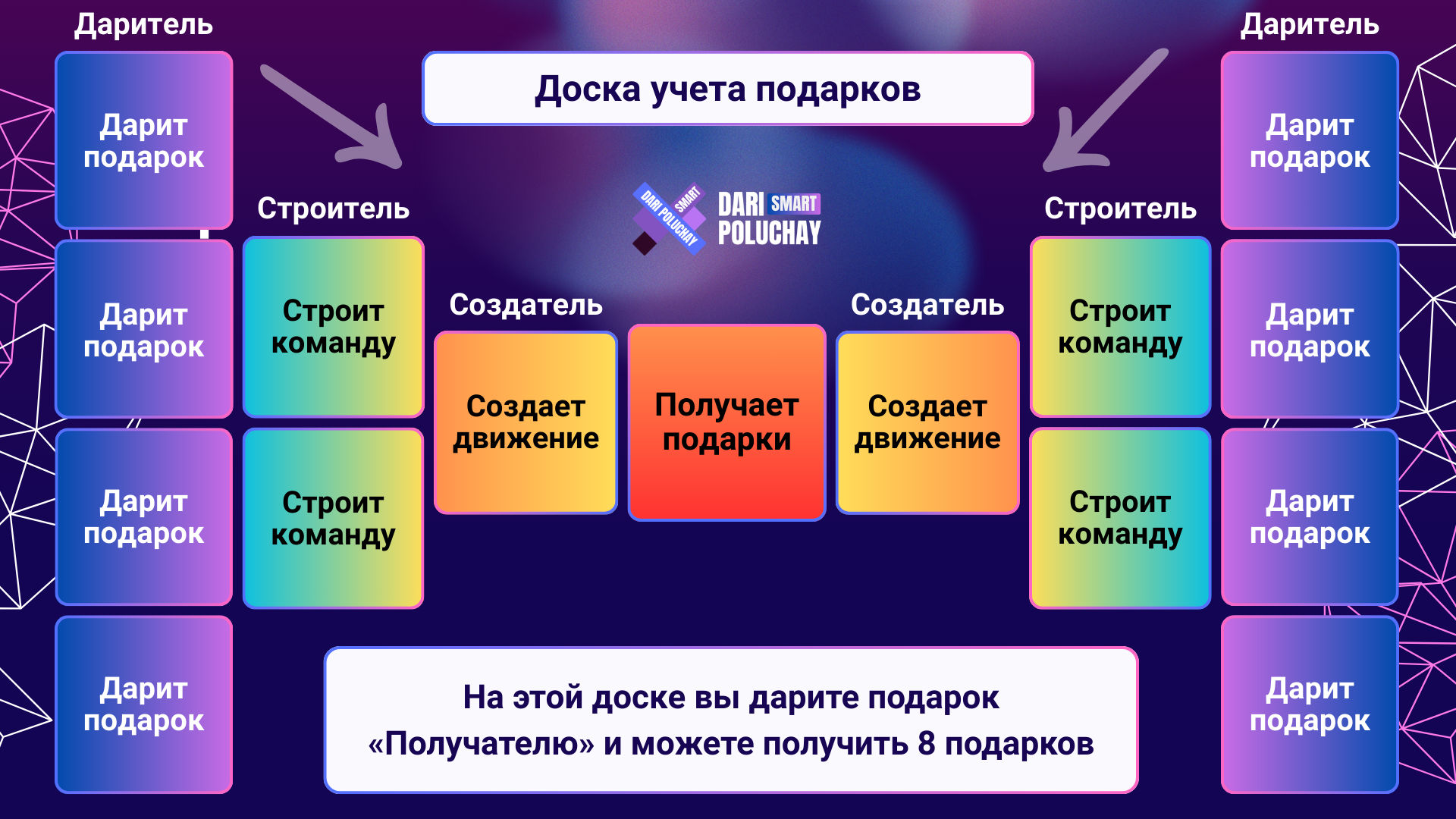
You enter the Board as a Giver (bottom position) and advance toward the center — the Recipient position. The more active the members on your side of the Board — the faster you advance.
Member Roles
There are four roles on the Board. Each is a stage of your journey to the Recipient position.
| 1 | Giver — starting position You send a gift to the member in the Recipient position. After sending, invite new members — this speeds up the Board filling. |
| 2 | Builder — intermediate position Invite members to fulfill your qualification. You will need it when you become a Creator and Recipient. |
| 3 | Creator — pre-final position At the next split, you become the Recipient of a new Board. You are directly interested in filling the Board. |
| 4 | Recipient — final position You receive up to 8 gifts from all Givers. Continue inviting — this strengthens your qualification at the next levels. |
The speed of Board filling depends on you and other members.
At any position, you don't need to passively wait for others. Invite new people, help partners understand the algorithm — and your side of the Board will fill faster.
Anna enters the Starter Board and sends a gift of 10 USDT — she is a Giver.
Her side of the Board fills (4 Givers sent gifts) — the first split occurs. Anna becomes a Builder. She invites two friends to the Starter Board — this is her future qualification.
Another filling of the side — Anna is now a Creator.
At the next split, she will take the Recipient position.
Third filling — Anna became a Recipient and begins receiving gifts from new Givers. In total, she can receive up to 8 gifts. (The eighth gift is reserved for reactivating the same Board again)
Movement on the Board
Your advancement on the Board occurs through the side split mechanism.
Each time all 4 Givers on your side have sent gifts — a split occurs, and you move up one position.
| → | You enter the Board at the Giver position and send a gift. |
| ↑ | First side filling — you move to the Builder position. |
| ↑ | Second filling — you are now at the Creator position. |
| ★ | Third filling — you have reached the Recipient position and receive up to 8 gifts. |
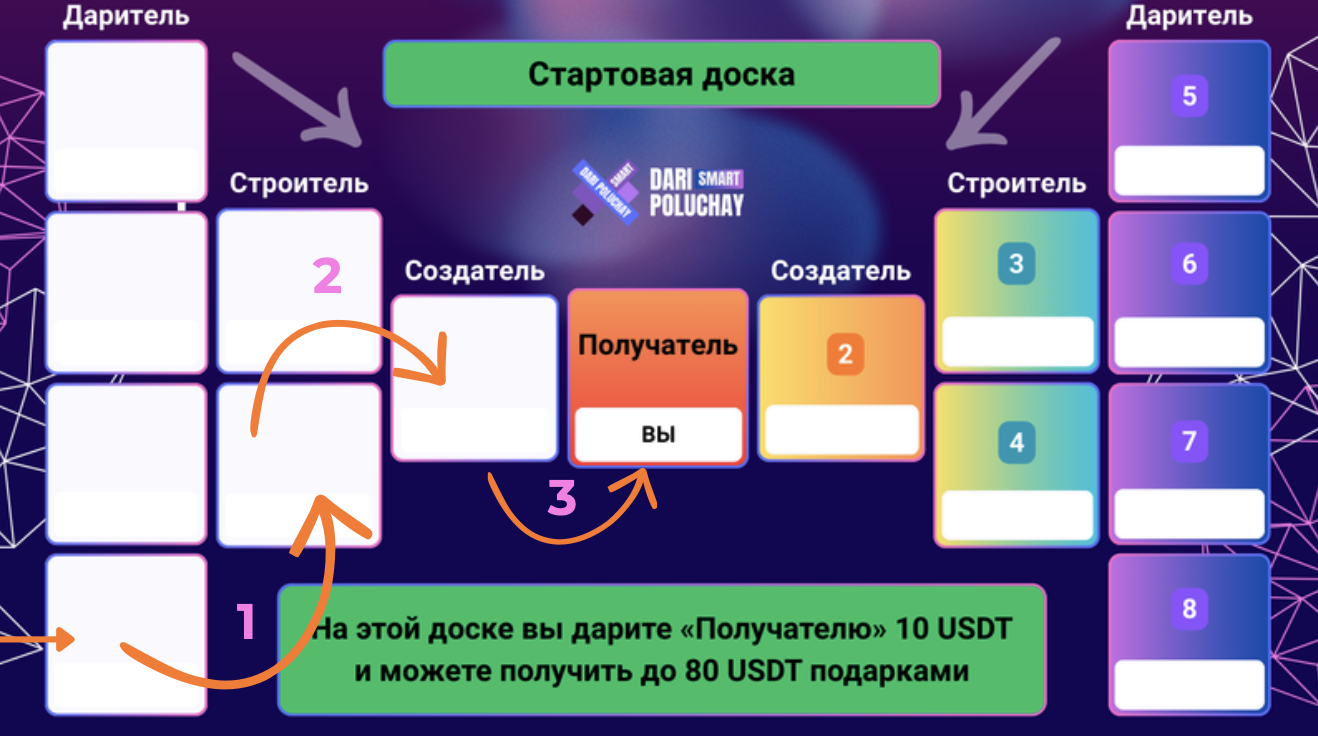
The classic path takes three filling cycles.
However, many members complete this path faster — in two cycles or even one.
This is possible thanks to the "Overtake" strategy.
Robert entered the Starter Board.
On his side there are 4 places for Givers.
When all 4 are filled and send gifts — a split will occur.
If Robert and his team actively invite members, splits can happen in a few days. If members are passive — filling the side may take longer.
Key point: Robert doesn't have to wait.
He can invite his acquaintances to fill his side of the Board faster.
Board Split
A split is an automatic stage that occurs separately for each side of the Board.
Four Givers on one side have taken all places, and all four gifts have been successfully sent to the Recipient.
What happens during a classic split:
| ✓ | Creator becomes the Recipient of a new Board. |
| ✓ | Builders become Creators. |
| ✓ | Givers become Builders. |
| ✓ | 8 new places for Givers open. |
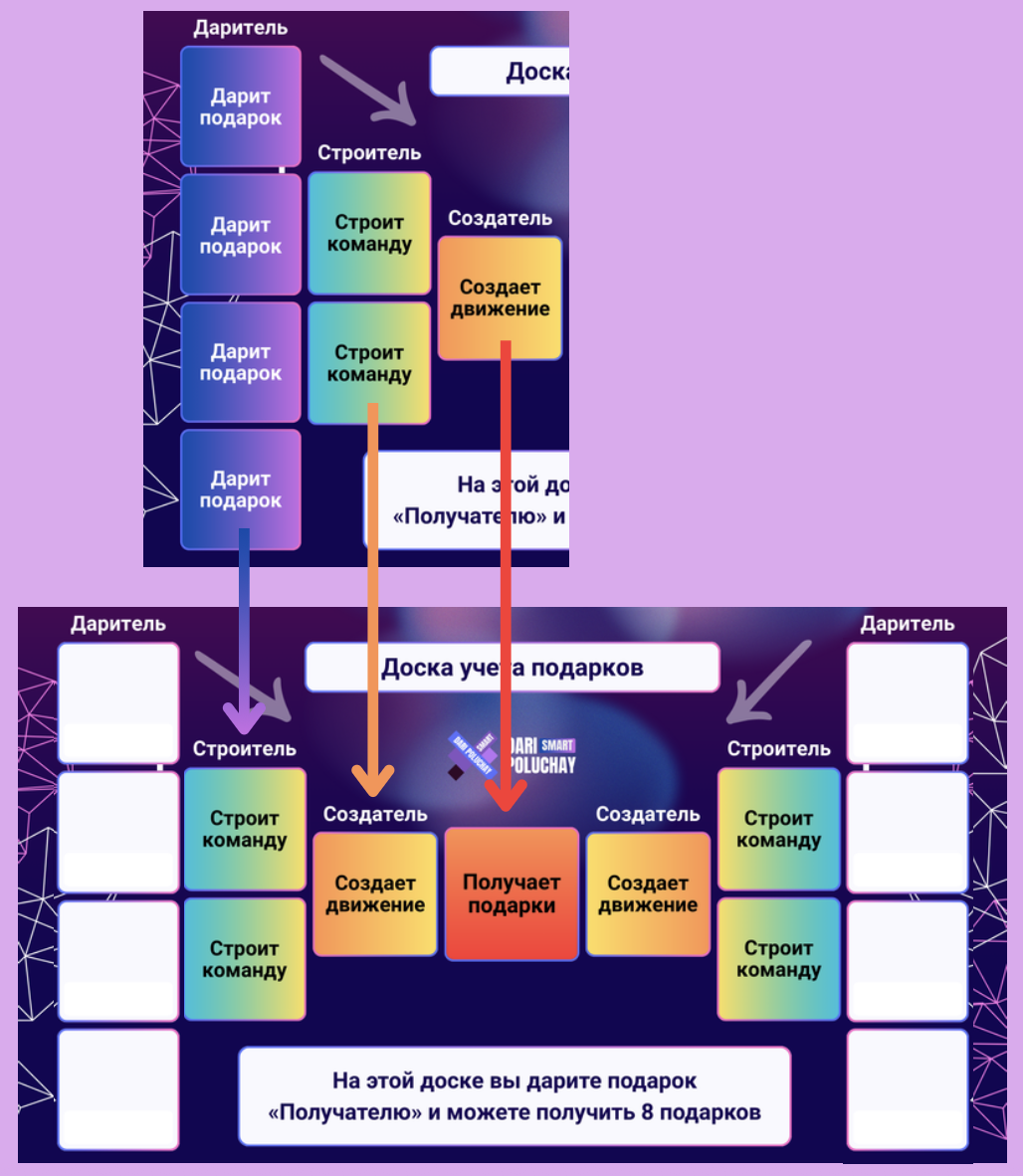
The left and right sides of the Board split independently of each other and may complete the cycle at different times.
On the left side of the Board:
• Creator — James
• Builders — Jessica and Michael
• 4 Givers sent all gifts
A split occurs:
• James (was Creator) → becomes Recipient on a new Board
• Jessica and Michael (were Builders) → become Creators
• All 4 Givers → become Builders
• 8 new places for Givers open
Meanwhile, the right side of the Board may be only half filled — it will split later when its 4 Givers also send gifts.
"Overtake" Strategy
"Overtake" is a situation when a member receives the Recipient position earlier than someone above them. This happens automatically when the higher-ranking member fails the algorithm check.
At each split, the algorithm checks candidates for the Recipient position by three criteria:
| 1 | Activity The member is not in "Sleeping" status. Global and Current activity apply. |
| 2 | No blocks No temporary or permanent account blocks. |
| 3 | Qualification Qualification counter is greater than zero (more details on the "Rules and Mechanics" page). |
On the left side of the Board:
• Creator — Emily (but she hasn't logged into the bot for 3 days — "Sleeping" status)
• Builders — Sarah and David
The left side is filled, a split occurs. The algorithm checks Emily:
• Activity — ❌ ("Sleeping" status)
Emily failed the check. The algorithm moves to the Builders. Sarah is active, no blocks, has qualification — ✅. Sarah overtakes Emily and becomes Recipient.
Emily remains on the Board — but now at the Creator position on a new Board. When she restores activity, she can become Recipient at the next split.
Recipient Selection Algorithm
When a Board side splits, the algorithm determines who will take the Recipient position. The check goes sequentially — from senior positions to junior.
The Creator is considered first. The bot checks them by three criteria: activity, no blocks, qualification. If all three checks pass — the Creator becomes Recipient.
If the Creator failed the check, the algorithm moves to the two Builders. Possible outcomes:
• One passed, the other didn't — the one who passed becomes Recipient, the one who didn't becomes Creator on a new Board.
• Both passed — the Priority Algorithm activates (described below).
• Neither passed — move to Stage 3.
If neither the Creator nor the Builders passed the check — the algorithm checks all four Givers by the same criteria.
• One passed — they become Recipient.
• Several passed — the Priority Algorithm activates.
Special case: if two or more active Givers have no invited members — the Recipient becomes the one who registered later. The others had more time to form a team.
The left side is filled, a split occurs. The algorithm begins checking:
Stage 1. Creator — John. Check: activity ✅, blocks ✅, qualification ❌ (0 invited on this Board). John failed.
Stage 2. Builders — Emma and Robert. Emma: activity ✅, blocks ✅, qualification ✅. Robert: activity ❌ ("Sleeping" status).
Result: Emma overtakes both John and Robert — becomes Recipient. John and Robert remain on new Boards at lower positions.
Creator — in "Sleeping" status. Both Builders are blocked (previously left Boards).
The algorithm moves to Stage 3 — Giver check. Of four Givers, two are active with qualification. The Priority Algorithm activates — and the Recipient becomes the one who invited more members to this Board.
Thus a Giver can overtake three levels at once (Builder, Creator) and become Recipient in one split.
Priority Algorithm
When two or more members simultaneously claim the Recipient position, the bot determines priority automatically by three criteria — sequentially:
| 1 | Personal partners on this Board The number of personally invited partners on the current level Board is compared. Priority goes to the one who invited more. |
| 2 | Depth of participation If the first criterion is equal — the bot looks at previous Boards, from the current down to Starter. Priority goes to the one with more partners on lower Boards. |
| 3 | Registration time If the number of partners on all Boards is the same — priority goes to the one who registered later. Those who have been in the Community longer had more time to develop their team. |
Under equal conditions, the algorithm supports new members. This helps the Community grow and attract active people.
On the Tin Board, two Builders claim the Recipient position — Sarah and Michael. Both are active, no blocks, with qualification.
Criterion 1 — partners on the Tin Board: Sarah invited 3, Michael invited 3. Equal.
Criterion 2 — depth of participation (Starter Board): Sarah has 5 partners on Starter, Michael has 4. Sarah gets priority and becomes Recipient.
If there was equality here too — priority would go to the one who registered later (Criterion 3).
Board Placement Algorithm
When you enter a Board, the bot automatically searches for a place for you using the following algorithm:
| 1 | Mentor's Board The bot searches for an active Board of the same gift amount from your direct inviter. Condition — the mentor must be active and have no blocks. |
| 2 | Duplicate check If you were already on the mentor's Board on one side and it hasn't split after your exit — this Board is skipped. You go to the next higher mentor. |
| 3 | Compression If it's impossible to get on the mentor's Board — the bot scans the mentor chain upward (up to 10,000 levels) and places you with the nearest active mentor who has a Board of the required gift amount and a free place. |
| 4 | Early Board If no one was found within 10,000 levels (extremely unlikely) — you go to the earliest open Board of the Community of this gift amount. |
Compression is an automatic search for a free place up the mentor chain. It protects you from a situation when the mentor is inactive: the bot will find the nearest active mentor and place you on their Board.
You cannot be on a Board where you have already been until it completely splits. This encourages mentors to be active, rather than hoping you will fill both sides of the Board with your efforts.
Jessica wants to enter the Tin Board. Her mentor is James.
Step 1. The bot searches for James's Tin Board. It exists, James is active, free places available. ✅ Jessica gets on James's Board.
But David has a different situation. His mentor is Emily, but she is in "Sleeping" status.
Step 1. Emily's Board is skipped (mentor inactive).
Step 3. Compression: the bot goes up the chain. Emily's mentor is Robert. Robert has a Tin Board, he is active, place is free. ✅ David gets on Robert's Board.
Emma was already on mentor John's Board on the left side — went from Giver to Recipient and exited. Now Emma is entering the Tin Board again (re-entry via Gift #8).
The bot checks: the left side of John's Board hasn't split after Emma's exit. So this Board is skipped — and Emma goes to the next higher mentor's Board.
This rule motivates John to actively work with his Board, rather than counting on Emma to fill both sides.
Placement Management
When you are a Recipient, you decide which side your personal partners enter the Board from.
The bot offers three distribution modes:
| Mode | Description | When to use |
| Auto | First partner to the left, second to the right, third to the left and so on. Even filling of both sides, starting from the left side top to bottom. | Default mode. Suitable for most situations. |
| Left | First all 4 places on the left top to bottom, then the right side. | If you need to split the left side faster. |
| Right | First all 4 places on the right top to bottom, then the left side. | If you need to split the right side faster. |
Want to become Recipient? You are Recipient on the Starter Board. On the left side there are already 3 Givers out of 4, and on the right — only 1.
You switch the mode to "Left". Your next invited partner will go to the left side — and it will fill. A split will occur, and you will receive the first 4 gifts.
After that you can switch the mode to "Right" — to fill the second side faster and receive the remaining gifts.
15-Minute Timer
After you take a Giver place on the Board, a 15-minute timer starts. This is time to look around the Board and make a final decision.
Three possible scenarios:
| 1 | Manual sending You click "Send gift". The gift instantly goes to the Recipient. |
| 2 | Auto-sending You do nothing. After 15 minutes the smart contract automatically sends the gift to the Recipient. |
| 3 | Leaving the Board You click "Leave board". The gift returns to you from the smart contract (minus network fee), and you receive a temporary block. |
Enter the Board only if you are ready to send a gift. Leaving the Board results in a temporary account block (from 72 to 288 hours). More details on the "Rules and Safety" page.
You entered the Starter Board and reserved 10 USDT. The timer started at 14:00.
Scenario A: At 14:03 you click "Send gift" — the gift instantly goes to the Recipient. Done.
Scenario B: You do nothing. At 14:15 the smart contract automatically sends the gift. The result is the same — you became a Giver on the Board.
Scenario C: At 14:10 you changed your mind and clicked "Leave board". 10 USDT return (minus ~0.01 TON network fee), but your account is blocked for 72 hours.
Auto-confirmation of Gift
The Recipient does not need to confirm gift receipt manually. As soon as the smart contract transferred USDT from the Giver to the Recipient's wallet — the gift is considered automatically confirmed.
| ✓ | No waiting for manual confirmation. |
| ✓ | Human factor and time zone differences eliminated. |
| ✓ | The process is fully automated by blockchain and bot algorithm. |
James is Recipient on the Starter Board. Sarah is a Giver who sent him a gift of 10 USDT.
James doesn't need to click anything. The smart contract automatically transferred 9.5 USDT (minus 5% fee) to his wallet. The bot recorded: Gift #3 from Sarah received. James will see a notification in the bot.
Sarah also doesn't wait — she is already at the Giver position, and her journey to the Recipient position begins immediately.
Why Invite Members
In the DP Smart Community there are no referral rewards and no marketing plan. You do not receive monetary bonuses for invitations — no percentages from gifts, no commissions, no multi-level accruals.
Invitations serve two functions:
| 📋 Board Filling The more members on your side of the Board — the faster the split occurs and the faster you advance to the Recipient position. |
🎯 Qualification The number of your personal partners determines how many times you can become Recipient at each level (more details on the "Rules and Mechanics" page). |
Invitations are not a source of income. They are a tool for movement on the Gift Tracking Boards. That's why DP Smart is a Community of mutual gifts, not network marketing.
Let's compare two members on the Starter Board:
James invited 4 people. All entered his side of the Board → split happened quickly → James is already a Builder in a few days. He has qualification = 4, which will allow him to become Recipient up to 4 times at this level.
Robert invited no one. Waiting for others to fill his side. The split is delayed. Qualification = 0 — even if he reaches the Creator position, he won't be able to become Recipient without qualification.
Invitations don't bring monetary bonuses, but directly affect speed and results.
The more active you and your team are — the faster the split and your advancement. "My Board" is not just a button in the bot. It's a winner's strategy.
• Algorithm: Rules and Mechanics — qualification, activity, "Sleeping" status, gift distribution and timers
• Rules and Safety — blocks, account protection, recovery and Community terminology